
Windows 11 vs Windows 10 (2026) – Which One Should You Choose?
Confused between Windows 11 and Windows 10? Discover key differences, performance, features, and which OS is best for your needs in 2026.
SOFTWARE BUYING GUIDES
Windows 11 vs Windows 10 – Which One Should You Buy in 2026?
A Complete, Real-World Guide to Help You Decide with Confidence
Choosing between Windows 11 and Windows 10 isn’t just about picking the newest version—it’s about finding what actually works best for your needs, your hardware, and your daily workflow.
Many users assume “newer is always better,” but that’s not always the case. In reality, your decision should depend on performance, compatibility, features, and how you use your PC. Whether you're a student, professional, gamer, or casual user, this guide will walk you through everything in a clear, practical way—so you can make the right choice without confusion.
The Evolution: What Really Changed from Windows 10 to Windows 11?
When Microsoft introduced Windows 11, it wasn’t just a visual upgrade—it was a shift toward a more modern, cloud-connected, and secure computing experience.
Windows 10, launched in 2015, has been one of the most stable and widely used operating systems ever. It became popular because of its familiarity, compatibility, and reliability. Over the years, it received consistent updates, making it a trusted choice for both personal and business use.
Windows 11, however, was designed with the future in mind. It focuses on a cleaner design, better multitasking tools, improved gaming features, and stronger security standards. But these improvements come with stricter hardware requirements, which is where many users hesitate.
Design & User Experience: A Fresh Look vs Familiar Comfort
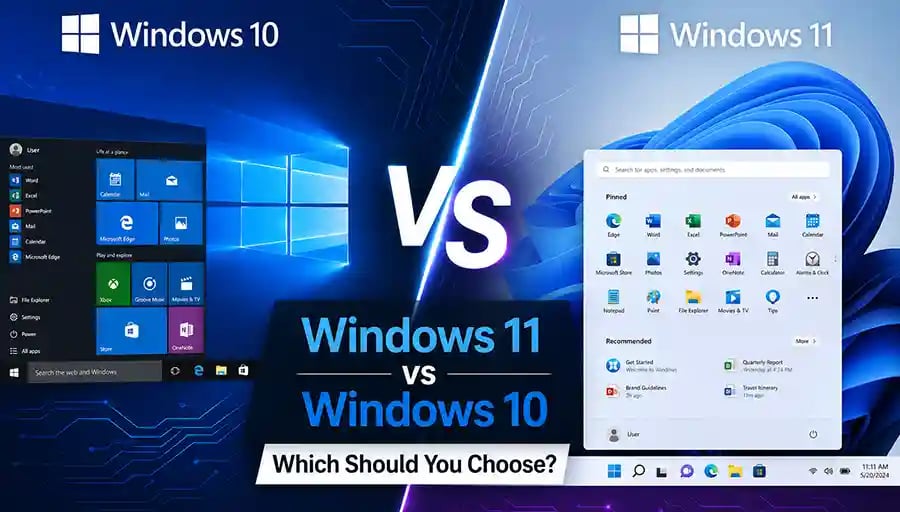
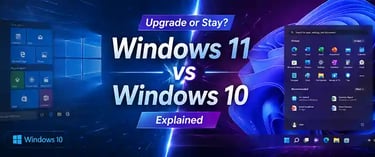
The first thing you’ll notice about Windows 11 is its modern, minimal design. The centered Start menu, rounded corners, and softer visuals give it a sleek, almost “Mac-like” feel. It’s cleaner and more visually appealing, especially for new users.
Windows 10, on the other hand, sticks to a traditional layout. The Start menu on the left, sharper edges, and classic interface make it feel familiar—especially if you’ve been using Windows for years.
If you prefer a fresh, modern experience, Windows 11 will feel exciting. But if you value familiarity and consistency, Windows 10 still holds strong.
Performance: Is Windows 11 Actually Faster?
Performance depends heavily on your hardware.
On newer devices, Windows 11 is optimized to deliver better speed, improved memory management, and smoother performance. Features like better CPU scheduling and faster wake times make a noticeable difference.
However, on older or unsupported hardware, Windows 10 often performs better. It’s lighter and more forgiving, which makes it ideal for budget or older PCs.
In simple terms:
New PC → Windows 11 shines
Older PC → Windows 10 remains reliable
🔐 About Genuine Softwares
We provide 100% genuine and verified software licenses at affordable prices. Instant delivery, secure payments, and reliable customer support — helping you stay protected and productive.
🛒 Popular Products
Explore some of our most popular genuine software licenses trusted by thousands of users.
🔎 Search Software
📩 Subscribe
📚 Blog Categories
Browse our helpful guides and tutorials to learn more about installing, activating, and using genuine software effectively.
Helpful tutorials for installing, activating, optimizing, and managing Microsoft Windows.
Helpful tutorials for installing and using Microsoft Office applications.
Learn how to choose the right software license for home or business.
Tips to keep your computer safe from malware, viruses, and cyber threats.
Compare different software versions to find the best option for your needs.
Quick solutions for software errors, installation issues, activation problems, performance fixes.
⭐ Why Choose Genuine Softwares?
We focus on delivering trusted, affordable, and genuine software solutions for individuals and businesses worldwide.
✔ 100% Genuine Software Licenses
✔ Instant Digital Delivery
✔ Secure Payment Methods
✔ Affordable Prices
✔ Activation Support Available
Features That Matter in Real Life
Windows 11 introduces several new features that genuinely improve productivity.
Snap Layouts and Snap Groups make multitasking easier by letting you organize multiple windows quickly. Virtual desktops are more refined, helping you separate work and personal tasks.
Gamers benefit from technologies like Auto HDR and DirectStorage, which improve graphics and loading times. If you’re into gaming, Windows 11 clearly has an edge.
Windows 10 still covers all essential needs—browsing, office work, media, and general productivity. But it lacks some of these newer enhancements.
Compatibility: The Biggest Deciding Factor
This is where many users face a real challenge.
Windows 11 requires newer hardware, including TPM 2.0 and supported processors. Many older PCs simply don’t meet these requirements.
Windows 10, in contrast, supports a much wider range of devices and software. If you rely on older applications, drivers, or hardware, Windows 10 is often the safer choice.
Before upgrading, always check your system compatibility—this step alone can save you a lot of frustration.
Security: Stronger Protection in Windows 11
Security is one of Windows 11’s biggest strengths.
It includes advanced protections like hardware-based isolation, secure boot, and improved encryption. These features make it more resistant to modern cyber threats.
Windows 10 is still secure and receives updates, but it doesn’t match the built-in security level of Windows 11.
If security is a top priority—especially for business or sensitive data—Windows 11 is the better option.
Support & Updates: What Happens in the Future?
Windows 10 is approaching the end of its lifecycle. Microsoft has officially announced that support for Windows 10 will end in October 2025.
This means:
No more security updates
No bug fixes
Increased risk over time
Windows 11, on the other hand, will continue receiving updates, improvements, and new features for years to come.
So while Windows 10 is still usable today, it’s not a long-term solution.
Who Should Choose Windows 10?
Windows 10 is still a great choice if your device is older or if you rely on legacy software. It offers stability, familiarity, and broad compatibility.
It’s especially suitable for users who don’t want to upgrade hardware or deal with new interface changes.
Who Should Choose Windows 11?
Windows 11 is ideal for users with modern hardware who want better performance, improved security, and a future-ready system.
If you’re buying a new PC in 2026, Windows 11 is the obvious choice. It’s designed for the next generation of computing and will be supported for years.
Final Verdict: Which One Should You Buy?
If your PC supports it, Windows 11 is the smarter long-term investment. It offers better security, modern features, and ongoing support.
But if your current system runs perfectly on Windows 10 and upgrading isn’t practical, sticking with it for now is completely reasonable—just be aware of its limited future support.
The best choice isn’t about what’s newest—it’s about what works best for you.
Genuine
Authentic Microsoft Software Solutions at Unbeatable Prices, Instant Delivery, Trusted Worldwide.
Support & Contact
Newsletter
customercare@genuinesoftwarekeys.com
+960 796 4737
© 2026. Genuine Software Keys. All rights reserved.
100% Genuine Software


Genuine License Guaranteed






Instant Delivery
Secure Payments
24/7 Customer Support
via Email
SSL Encrypted
We’re Here Anytime


Software Keys
Subscribe Now & Unlock Exclusive Deals, Special Discounts, and the Latest Offers.
Available 24/7 – Get a Response Within 2 Minutes, Anytime You Need Us.
Popular Products


We Accept




✔ No Spam
✔ Special Offers
✔ Early Access Details
SSL Secured


Your data is safe with us
Delivery Policy | Terms and Conditions
Microsoft Office 365 Professional Plus