

Microsoft Office 2021 vs Microsoft 365: Features, Pricing & Best Choice in 2026
Compare Microsoft Office 2021 and Microsoft 365 in detail. Learn about pricing, features, updates, cloud storage, security, and discover which Microsoft Office version is best for home, students, and businesses in 2026.
SOFTWARE BUYING GUIDES
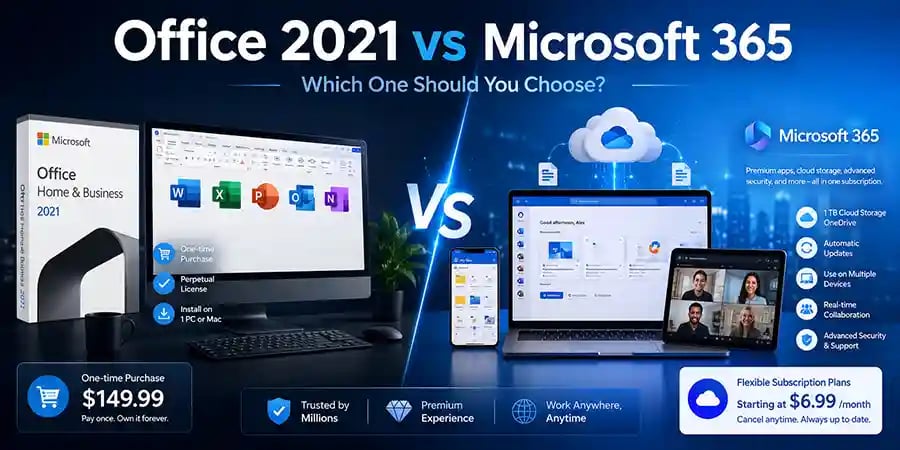
Microsoft Office 2021 vs Microsoft 365 – Which Is Better for You in 2026?
Understanding the Key Differences Between Microsoft Office 2021 and Microsoft Office 365
For many users, choosing between Microsoft Office 2021 and Microsoft 365 can be surprisingly difficult. Both products give you access to familiar applications such as Word, Excel, PowerPoint, and Outlook, but they are designed for different types of users and offer very different experiences.
Some people prefer a one-time purchase and never want to think about subscriptions. Others want the latest features, cloud storage, and the flexibility to work from multiple devices. If you're planning to buy Microsoft Office in 2026, understanding the differences between these two options can save you money and help you choose the right productivity solution for your needs.
In this guide, we'll compare Microsoft Office 2021 and Microsoft 365 in detail, including pricing, features, updates, security, cloud storage, device support, and long-term value.
What Is Microsoft Office 2021?
Microsoft Office 2021 is the traditional version of Microsoft Office that you purchase once and own permanently. After paying for the license, you can install it on your computer and use it without monthly or yearly subscription fees.
Office 2021 includes popular applications such as Word, Excel, PowerPoint, Outlook, and depending on the edition, additional programs for professional users.
One of the biggest advantages of Office 2021 is simplicity. You pay once, activate the software, and continue using it for years without worrying about recurring charges.
However, while you receive security updates, you do not receive major feature upgrades introduced after the version's release.
What Is Microsoft 365?
Microsoft 365 is Microsoft's subscription-based productivity platform. Instead of paying once, users pay monthly or annually to access Office applications and additional cloud-based services.
Microsoft 365 includes:
Microsoft Word
Microsoft Excel
Microsoft PowerPoint
Microsoft Outlook
Microsoft OneDrive
Microsoft Teams
Microsoft Defender Security Features
Continuous Feature Updates
Unlike Office 2021, Microsoft 365 is constantly evolving. Microsoft regularly introduces new features, AI-powered tools, security improvements, and collaboration enhancements.
For users who always want the latest version of Office, Microsoft 365 is Microsoft's primary focus moving forward.
The Biggest Difference: One-Time Purchase vs Subscription
The most important distinction between the two products is how you pay for them.
Office 2021 requires a single upfront payment. Once purchased, the software belongs to you and can be used indefinitely on the licensed device.
Microsoft 365 requires an active subscription. As long as your subscription remains active, you continue receiving updates, cloud services, and premium features.
Think of Office 2021 as buying a car outright, while Microsoft 365 is more like leasing a vehicle that continuously receives upgrades and improvements.
Comparing Features and Functionality
When Office 2021 was released, it included many useful improvements over previous versions. However, Microsoft 365 users continue receiving new features every year.
This means that over time, the gap between Office 2021 and Microsoft 365 becomes larger.
Microsoft 365 subscribers gain access to:
Real-time collaboration tools, advanced Excel functions, AI-powered productivity features, cloud-based document management, enhanced security tools, and integrations with Microsoft's latest services.
Office 2021 users retain the features available at the time of purchase but do not receive future feature releases.
For businesses and power users, these continuous improvements can significantly impact productivity.
Cloud Storage and Accessibility
Modern work environments increasingly depend on cloud storage and remote access.
Microsoft 365 includes OneDrive cloud storage, allowing users to access files from almost anywhere. Documents automatically synchronize across devices, making it easier to work from home, the office, or while traveling.
You can start editing a document on your laptop, continue on your tablet, and review it later on your smartphone.
Office 2021 primarily focuses on local installation and local file storage. While users can still utilize cloud services separately, the experience is not as deeply integrated as Microsoft 365.
For users who regularly switch between devices, Microsoft 365 offers a clear advantage.
Device Support and Flexibility
Office 2021 licenses are generally tied to a single device.
Microsoft 365 subscriptions allow installation across multiple devices, including:
Windows PCs
Mac computers
Tablets
Smartphones
This flexibility is especially useful for students, remote workers, freelancers, and business professionals who use several devices throughout the day.
A single Microsoft 365 subscription can often cover multiple devices, reducing overall software costs.
🔐 About Genuine Softwares
We provide 100% genuine and verified software licenses at affordable prices. Instant delivery, secure payments, and reliable customer support — helping you stay protected and productive.
🛒 Popular Products
Explore some of our most popular genuine software licenses trusted by thousands of users.
🔎 Search Software
📩 Subscribe
📚 Blog Categories
Browse our helpful guides and tutorials to learn more about installing, activating, and using genuine software effectively.
Helpful tutorials for installing, activating, optimizing, and managing Microsoft Windows.
Helpful tutorials for installing and using Microsoft Office applications.
Learn how to choose the right software license for home or business.
Tips to keep your computer safe from malware, viruses, and cyber threats.
Compare different software versions to find the best option for your needs.
Quick solutions for software errors, installation issues, activation problems, performance fixes.
⭐ Why Choose Genuine Softwares?
We focus on delivering trusted, affordable, and genuine software solutions for individuals and businesses worldwide.
✔ 100% Genuine Software Licenses
✔ Instant Digital Delivery
✔ Secure Payment Methods
✔ Affordable Prices
✔ Activation Support Available
Security and Updates
Cybersecurity threats continue to evolve every year. Software that receives ongoing updates is generally better equipped to handle emerging threats.
Office 2021 receives security updates but does not receive continuous feature development.
Microsoft 365 receives:
Regular security enhancements
New protection technologies
Improved anti-malware integration
Updated collaboration security controls
Advanced cloud protection
For businesses handling sensitive information, these ongoing updates can provide additional peace of mind.
Which Option Is Better for Students?
Students often need flexibility, cloud storage, and collaboration features.
Microsoft 365 is usually the better choice because assignments, group projects, and online learning increasingly depend on cloud-based tools and document sharing.
Students also benefit from automatic updates and access across multiple devices.
However, if a student primarily works on one computer and wants to avoid recurring costs, Office 2021 remains a practical option.
Which Option Is Better for Home Users?
For casual home users, the answer depends on usage patterns.
If you simply create documents occasionally, manage household budgets, and prepare presentations a few times each year, Office 2021 may provide everything you need.
If your household uses multiple devices, shares documents, stores files online, or collaborates frequently, Microsoft 365 typically offers greater long-term value.
Which Option Is Better for Businesses?
Businesses increasingly depend on collaboration, cloud storage, remote access, and cybersecurity.
Microsoft 365 was specifically designed to support modern workplaces. Teams can work simultaneously on documents, share files instantly, and access productivity tools from virtually anywhere.
For most organizations, Microsoft 365 delivers a more scalable and future-ready solution than Office 2021.
Cost Comparison: Which Saves More Money?
Many buyers focus only on the initial purchase price, but long-term value is equally important.
Office 2021 may appear less expensive because it requires only one payment.
Microsoft 365 may cost more over several years, but it includes cloud storage, multiple-device support, continuous upgrades, and premium services that would otherwise require separate purchases.
The better value depends on how extensively you use Microsoft's ecosystem.
Users who need only basic Office functionality often save money with Office 2021.
Users who rely on cloud productivity tools often find Microsoft 365 more cost-effective over time.
Final Verdict: Microsoft Office 2021 or Microsoft 365?
Choosing between Microsoft Office 2021 and Microsoft 365 ultimately comes down to your personal needs.
Office 2021 remains an excellent choice for users who prefer a one-time purchase, use a single computer, and don't require constant updates or cloud-based features.
Microsoft 365 is the stronger option for users who want the latest Office innovations, multiple-device access, cloud storage, enhanced security, and collaboration tools.
As Microsoft continues investing heavily in cloud productivity and AI-powered features, Microsoft 365 is increasingly becoming the preferred choice for students, professionals, remote workers, and businesses. However, Office 2021 still provides reliable, familiar productivity software for users who value simplicity and ownership.
Before making your purchase, consider how you work today—and how you expect to work in the future. The right choice isn't simply the cheapest option; it's the one that best supports your productivity goals.

Genuine
Authentic Microsoft Software Solutions at Unbeatable Prices, Instant Delivery, Trusted Worldwide.
Support & Contact
Newsletter
customercare@genuinesoftwarekeys.com
+960 796 4737
© 2026. Genuine Software Keys. All rights reserved.
100% Genuine Software


Genuine License Guaranteed






Instant Delivery
Secure Payments
24/7 Customer Support
via Email
SSL Encrypted
We’re Here Anytime


Software Keys
Subscribe Now & Unlock Exclusive Deals, Special Discounts, and the Latest Offers.
Available 24/7 – Get a Response Within 2 Minutes, Anytime You Need Us.
Popular Products


We Accept




✔ No Spam
✔ Special Offers
✔ Early Access Details
SSL Secured


Your data is safe with us
Delivery Policy | Terms and Conditions
Microsoft Office 365 Professional Plus