
How to Check If Your Windows License Is Genuine (Step-by-Step Guide 2026)
Learn how to check if your Windows license is genuine using simple methods like Settings, Command Prompt, and activation tools. Stay secure and avoid pirated software.
WINDOWS GUIDES
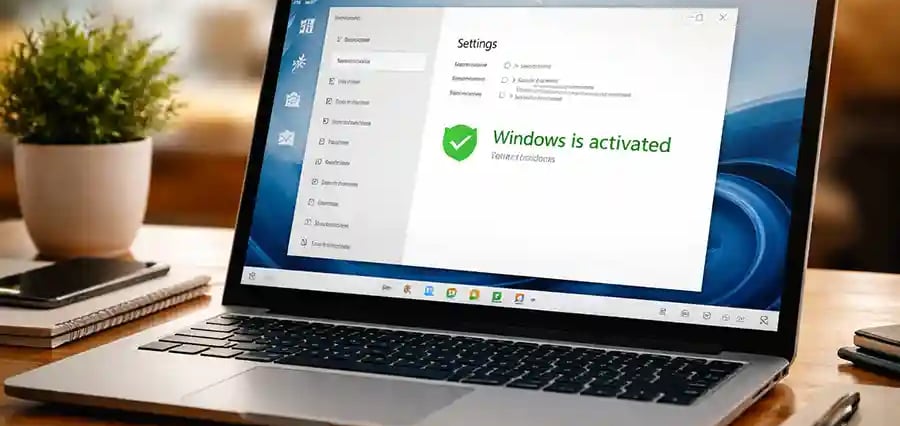
How to Check If Your Windows License Is Genuine (Complete 2026 Guide)
Using a genuine copy of Windows isn’t just about legality—it directly affects your system’s security, performance, and long-term reliability. If you’re unsure whether your copy of Microsoft Windows is genuine, this guide will walk you through multiple easy methods to verify it—no technical expertise required.
Why Checking Your Windows License Matters
A non-genuine Windows version can cause:
🚫 Limited features and personalization restrictions
⚠️ Frequent activation warnings
🔓 Security vulnerabilities and malware risks
❌ No official updates from Microsoft
💡 If you care about your data and system stability, verifying your license is essential.
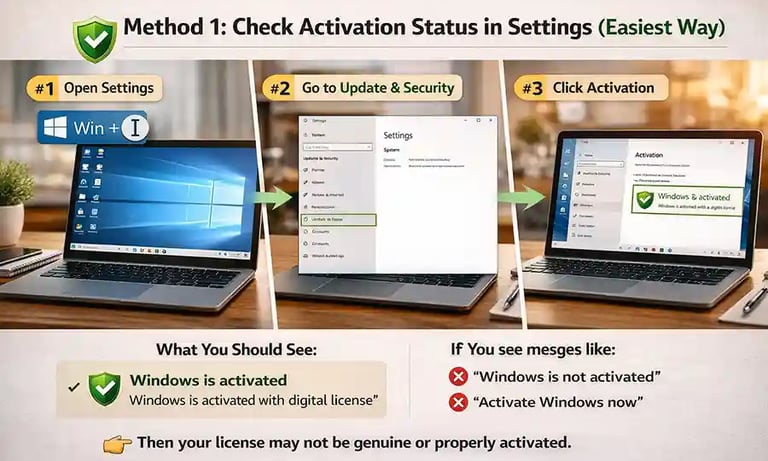
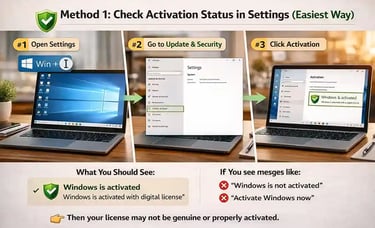
Method 1: Check Activation Status in Settings (Easiest Way)
This is the quickest and most user-friendly method.
Steps:
Press Windows + I to open Settings
Go to Update & Security
Click Activation
What You Should See:
✔️ “Windows is activated”
✔️ “Windows is activated with a digital license”
If you see messages like:
❌ “Windows is not activated”
❌ “Activate Windows now”
👉 Then your license may not be genuine or properly activated.
🔐 About Genuine Softwares
We provide 100% genuine and verified software licenses at affordable prices. Instant delivery, secure payments, and reliable customer support — helping you stay protected and productive.
🛒 Popular Products
Explore some of our most popular genuine software licenses trusted by thousands of users.
🔎 Search Software
📩 Subscribe
📚 Blog Categories
Browse our helpful guides and tutorials to learn more about installing, activating, and using genuine software effectively.
Helpful tutorials for installing, activating, optimizing, and managing Microsoft Windows.
Helpful tutorials for installing and using Microsoft Office applications.
Learn how to choose the right software license for home or business.
Tips to keep your computer safe from malware, viruses, and cyber threats.
Compare different software versions to find the best option for your needs.
Quick solutions for software errors, installation issues, activation problems, performance fixes.
⭐ Why Choose Genuine Softwares?
We focus on delivering trusted, affordable, and genuine software solutions for individuals and businesses worldwide.
✔ 100% Genuine Software Licenses
✔ Instant Digital Delivery
✔ Secure Payment Methods
✔ Affordable Prices
✔ Activation Support Available
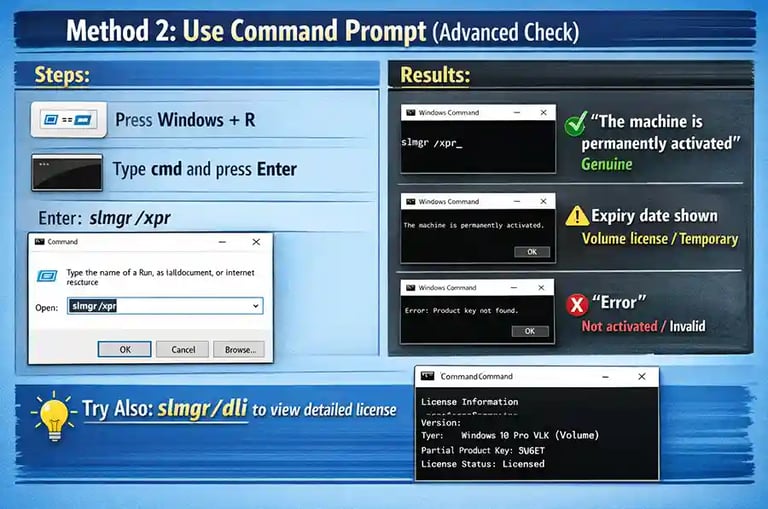
Method 2: Use Command Prompt (Advanced Check)
For a deeper check, use built-in commands:
Steps:
Press Windows + R
Type cmd and press Enter
Enter the following command:
slmgr /xpr
Results:
✔️ “The machine is permanently activated” → Genuine
⚠️ Expiry date shown → Volume license or temporary
❌ Error → Not activated or invalid
💡 You can also try:
slmgr /dli
to get detailed license information.
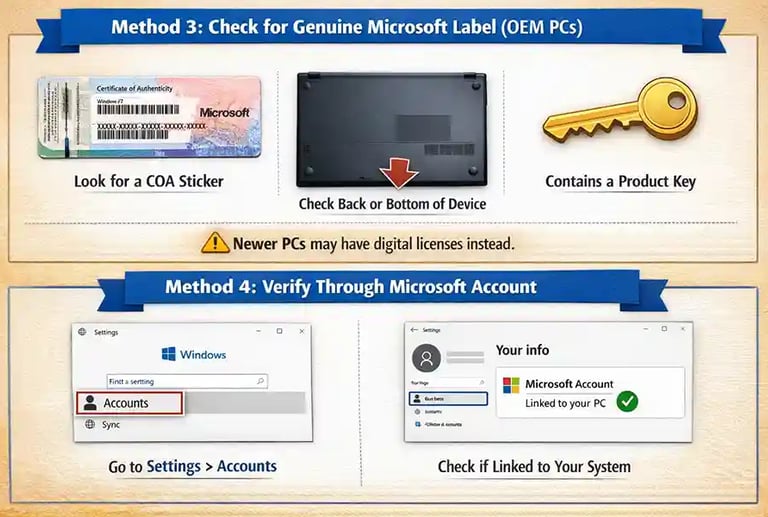
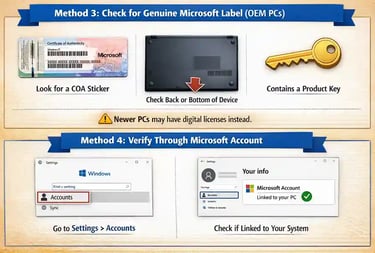
Method 3: Check for Genuine Microsoft Label (OEM PCs)
If you purchased a laptop or branded PC:
Look for a Certificate of Authenticity (COA) sticker
Usually found on the back or bottom of the device
Contains a product key
⚠️ Note: Newer PCs may not have stickers but use digital licenses instead.
Method 4: Verify Through Microsoft Account
If your Windows is linked to your Microsoft account:
Go to Settings > Accounts
Check if your system is linked
A genuine license is often tied to your account and hardware.
Signs Your Windows May NOT Be Genuine
Watch out for these warning signs:
“Activate Windows” watermark on screen
Frequent pop-up activation messages
Unable to change wallpaper or themes
Updates failing or disabled
System behaving unusually slow
Risks of Using Pirated Windows
Using cracked or pirated versions can lead to:
🦠 Malware infections and spyware
🔓 Data theft and privacy breaches
💻 System crashes and instability
🚫 Legal consequences
💡 Many pirated versions are modified and unsafe.
What to Do If Your Windows Is Not Genuine
✔️ Option 1: Activate with a Valid Key
Purchase a genuine license from trusted sources like Microsoft.
✔️ Option 2: Buy a Digital License
You can activate directly through Windows settings.
✔️ Option 3: Contact Support
If you already paid for a license, contact Microsoft support for help.
Pro Tips to Ensure Genuine Windows
Always buy from official or authorized sellers
Avoid “cheap keys” from unknown websites
Keep your system updated regularly
Link your license to your Microsoft account
Genuine
Authentic Microsoft Software Solutions at Unbeatable Prices, Instant Delivery, Trusted Worldwide.
Support & Contact
Newsletter
customercare@genuinesoftwarekeys.com
+960 796 4737
© 2026. Genuine Software Keys. All rights reserved.
100% Genuine Software


Genuine License Guaranteed






Instant Delivery
Secure Payments
24/7 Customer Support
via Email
SSL Encrypted
We’re Here Anytime


Software Keys
Subscribe Now & Unlock Exclusive Deals, Special Discounts, and the Latest Offers.
Available 24/7 – Get a Response Within 2 Minutes, Anytime You Need Us.
Popular Products


We Accept




✔ No Spam
✔ Special Offers
✔ Early Access Details
SSL Secured


Your data is safe with us
Delivery Policy | Terms and Conditions
Microsoft Office 365 Professional Plus