

Free Office Alternatives vs Microsoft Office – Are Free Office Suites Worth It in 2026?
Compare free Office alternatives like LibreOffice, Google Docs, and WPS Office with Microsoft Office. Learn about features, compatibility, security, pricing, and discover which office suite is best for your needs in 2026.
PRODUCT COMPARISONS
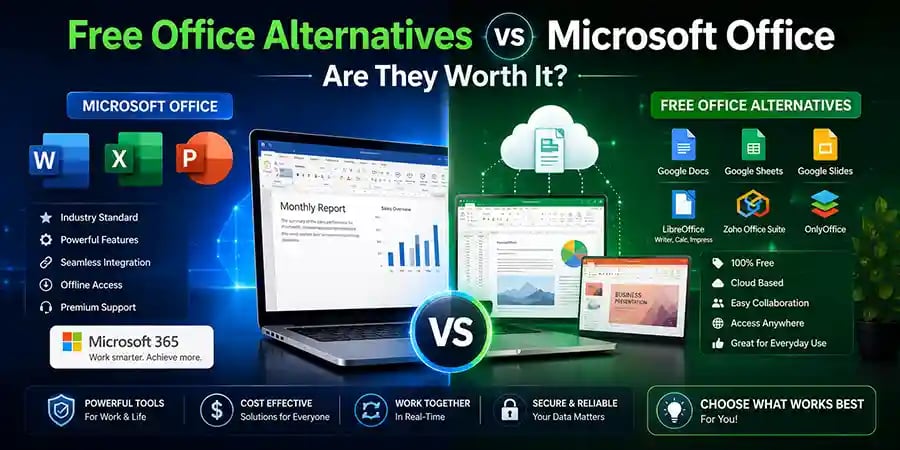
Free Office Alternatives vs Microsoft Office – Are They Worth It?
A Complete Comparison of Free Office Suites and Microsoft Office for Home, Students, and Business Users
For decades, Microsoft Office has been the gold standard for productivity software. Whether you're writing reports in Word, managing data in Excel, creating presentations in PowerPoint, or organizing emails through Outlook, Microsoft Office has become deeply integrated into schools, businesses, and homes around the world.
However, as software prices and subscription costs continue to rise, many users are beginning to ask an important question: Do you really need Microsoft Office, or can free alternatives do the job just as well?
Today, there are several free office suites that promise document creation, spreadsheet management, presentation tools, and cloud collaboration without requiring users to spend a single dollar. Some of these alternatives have evolved into surprisingly powerful productivity platforms that can handle most everyday tasks.
But are they truly good enough to replace Microsoft Office? Or do hidden limitations make Microsoft Office worth the investment?
Let's take a detailed look at both options to help you make the right choice.
Why More Users Are Considering Free Office Software
The way people work has changed dramatically over the last decade. Many users no longer require advanced business tools or complex enterprise features. Students write assignments, freelancers create invoices, small businesses manage basic spreadsheets, and families keep household budgets.
For these everyday tasks, paying for premium software may not always seem necessary.
At the same time, free office applications have become more powerful, user-friendly, and compatible with Microsoft Office file formats. As a result, many users are exploring whether they can save money without sacrificing productivity.
This shift has created intense competition between Microsoft Office and free office suites.
What Makes Microsoft Office the Industry Standard?
Microsoft Office didn't become the world's most popular productivity suite by accident.
Over many years, Microsoft has refined its applications to support everything from simple documents to complex business operations. Word remains one of the most advanced word processors available, Excel is widely regarded as the most powerful spreadsheet application in the world, and PowerPoint continues to dominate presentation software.
One of Microsoft's greatest strengths is consistency. Businesses, schools, and organizations use Office because they know documents will look correct, formulas will work properly, and collaboration tools will integrate seamlessly.
Microsoft Office also receives regular updates, security improvements, cloud features, and productivity enhancements that help users work more efficiently.
For professionals and organizations, this reliability often justifies the cost.
The Rise of Free Office Alternatives
Free office software has improved dramatically over the years.
In the past, free alternatives often felt incomplete, outdated, or difficult to use. Today, many offer polished interfaces, strong file compatibility, cloud integration, and feature sets that satisfy the needs of most users.
Popular free office alternatives include:
LibreOffice, Google Docs, WPS Office, Apache OpenOffice, ONLYOFFICE, and FreeOffice.
Each option offers unique strengths and targets different types of users. Some focus on traditional desktop productivity while others emphasize cloud collaboration and accessibility.
This increased competition gives consumers more choices than ever before.
LibreOffice: The Most Powerful Free Desktop Suite
When discussing free office software, LibreOffice is usually the first name that comes up.
LibreOffice is an open-source productivity suite that includes applications for word processing, spreadsheets, presentations, databases, and graphics. It is completely free and actively maintained by a global community of developers.
Many users appreciate LibreOffice because it provides a traditional desktop experience similar to older versions of Microsoft Office. It supports many Microsoft file formats and offers advanced functionality that goes far beyond basic document editing.
For students, educators, freelancers, and small businesses looking for a free desktop solution, LibreOffice remains one of the strongest choices available.
Google Docs: The King of Online Collaboration
Google Docs takes a completely different approach.
Instead of focusing primarily on desktop software, Google built its productivity suite around cloud computing. Users can create, edit, and share documents directly through a web browser without installing any software.
One of Google Docs' biggest advantages is real-time collaboration. Multiple users can edit the same document simultaneously, making it ideal for teams, classrooms, and remote workers.
Files are automatically saved to the cloud, reducing the risk of losing important work.
For users who prioritize accessibility and teamwork over advanced desktop features, Google Docs can be an excellent alternative.
🔐 About Genuine Softwares
We provide 100% genuine and verified software licenses at affordable prices. Instant delivery, secure payments, and reliable customer support — helping you stay protected and productive.
🛒 Popular Products
Explore some of our most popular genuine software licenses trusted by thousands of users.
🔎 Search Software
📩 Subscribe
📚 Blog Categories
Browse our helpful guides and tutorials to learn more about installing, activating, and using genuine software effectively.
Helpful tutorials for installing, activating, optimizing, and managing Microsoft Windows.
Helpful tutorials for installing and using Microsoft Office applications.
Learn how to choose the right software license for home or business.
Tips to keep your computer safe from malware, viruses, and cyber threats.
Compare different software versions to find the best option for your needs.
Quick solutions for software errors, installation issues, activation problems, performance fixes.
⭐ Why Choose Genuine Softwares?
We focus on delivering trusted, affordable, and genuine software solutions for individuals and businesses worldwide.
✔ 100% Genuine Software Licenses
✔ Instant Digital Delivery
✔ Secure Payment Methods
✔ Affordable Prices
✔ Activation Support Available
WPS Office: A Familiar Experience for Microsoft Office Users
WPS Office has become increasingly popular because of its modern design and familiar interface.
Many users transitioning from Microsoft Office find WPS Office easy to learn because the layout closely resembles Word, Excel, and PowerPoint.
The software offers strong file compatibility and includes features that are often missing from other free alternatives. This makes it appealing to users who want a Microsoft Office-like experience without paying for a subscription.
While some premium features require payment, the free version is capable enough for many everyday tasks.
File Compatibility: Where Microsoft Office Still Wins
One of the most important considerations when choosing office software is compatibility.
Microsoft Office files have become the standard in business, education, and government environments. While free office suites can usually open and edit these files, compatibility is not always perfect.
Simple documents generally work well across platforms. However, complex formatting, advanced Excel formulas, macros, custom templates, and specialized business documents can sometimes display incorrectly when opened in alternative software.
For casual users, these differences may be insignificant. For professionals who exchange important documents regularly, compatibility issues can lead to frustration and lost productivity.
This remains one of Microsoft's strongest advantages.
Advanced Features and Productivity Tools
For basic tasks such as writing letters, creating reports, managing household budgets, and preparing presentations, most free office suites perform exceptionally well. The difference becomes more noticeable when users require advanced functionality.
Microsoft Excel offers powerful business intelligence features, data analysis tools, automation capabilities, and advanced formulas that are difficult for competitors to match. Microsoft Word provides sophisticated document review systems, publishing tools, and enterprise-level collaboration features.
PowerPoint includes advanced presentation design options that many professionals rely on. For power users and businesses, these advanced capabilities often justify the investment in Microsoft Office.
Cloud Storage and Multi-Device Access
Modern productivity increasingly depends on cloud services.
Microsoft 365 integrates seamlessly with OneDrive, allowing users to access files from multiple devices and collaborate with colleagues in real time. Google Docs excels in this area as well, offering automatic cloud storage and effortless sharing.
Traditional desktop-focused alternatives like LibreOffice provide excellent offline functionality but may require additional services to achieve the same cloud experience. Users who frequently switch between devices should carefully consider cloud integration before choosing an office suite.
Security and Software Updates
Security is often overlooked when comparing office software.
Microsoft invests heavily in protecting users through regular updates, security patches, and advanced threat protection systems. Business users especially benefit from Microsoft's ongoing security improvements.
Reputable free office suites also release updates, but support levels and update frequency can vary.
Regardless of which solution you choose, downloading software only from official sources and keeping applications updated is essential for maintaining security.
Which Users Should Choose Free Office Alternatives?
Free office software is often ideal for students completing assignments, home users creating documents, freelancers managing basic business tasks, and small organizations looking to reduce software costs.
If your daily work involves standard documents, simple spreadsheets, and occasional presentations, free office suites may provide everything you need. Many users discover they can accomplish nearly all of their tasks without spending money on premium software.
Which Users Should Choose Microsoft Office?
Microsoft Office remains the preferred choice for professionals, corporations, accountants, analysts, project managers, and businesses that depend on advanced productivity tools.
Users who frequently exchange files with clients, work with complex Excel spreadsheets, or require guaranteed compatibility often benefit significantly from Microsoft's ecosystem. The investment becomes even more valuable for organizations that rely on collaboration, cloud storage, and enterprise-grade security.
The Hidden Cost of "Free"
While free office software can save money, users should also consider potential trade-offs. Learning a new interface, dealing with occasional compatibility issues, missing advanced features, or relying on third-party cloud services can sometimes create hidden costs in time and productivity.
In some situations, the convenience and reliability of Microsoft Office may outweigh the financial savings offered by free alternatives. The true value depends on how you use your productivity software every day.
Final Verdict: Are Free Office Alternatives Worth It?
The answer is yes—for many users.
Free office alternatives have matured into powerful productivity tools capable of handling the vast majority of everyday tasks. Students, home users, freelancers, and small businesses can often save money without sacrificing functionality. However, Microsoft Office continues to lead in compatibility, advanced features, cloud integration, security, and professional productivity. For organizations and power users, these advantages remain difficult to ignore.
The best choice depends on your needs, budget, and workflow. If your requirements are basic, a free office suite may be all you ever need. If your work depends on maximum reliability, collaboration, and advanced features, Microsoft Office remains one of the best productivity investments available.
Rather than asking which option is universally better, the smarter question is: Which option helps you work more efficiently? Once you answer that, the right choice becomes clear.

Genuine
Authentic Microsoft Software Solutions at Unbeatable Prices, Instant Delivery, Trusted Worldwide.
Support & Contact
Newsletter
customercare@genuinesoftwarekeys.com
+960 796 4737
© 2026. Genuine Software Keys. All rights reserved.
100% Genuine Software


Genuine License Guaranteed






Instant Delivery
Secure Payments
24/7 Customer Support
via Email
SSL Encrypted
We’re Here Anytime


Software Keys
Subscribe Now & Unlock Exclusive Deals, Special Discounts, and the Latest Offers.
Available 24/7 – Get a Response Within 2 Minutes, Anytime You Need Us.
Popular Products


We Accept




✔ No Spam
✔ Special Offers
✔ Early Access Details
SSL Secured


Your data is safe with us
Delivery Policy | Terms and Conditions
Microsoft Office 365 Professional Plus